







Help
Do you need help assessing whether or not your article is scholarly? Judging the authority of a resource? Need help researching? We have numerous subject specific Research Guides that can be a good place to begin research. Online tutorials are available to teach beginning search skills using library databases.
Help Topics
Citation & Writing Tools
McMillen Library provides an online guide to citation styles, such as APA/MLA/IEEE, citation software to help you generate citations, information about reference management software for research needs, as well as a link to the Writing Center – your one-stop point for all your citation and writing needs. Take a look at the Citation Guide.
Library FAQ
If you need help outside of library business hours, take a look at the Library’s FAQ list which provides answers to the most common questions we are asked. You can access our FAQ page.
Research Guides
Our librarians create and curate Research Guides specific to subjects, courses, and even assignments. Please check our Research Guides.
Login to McMillen Library Catalog (EDS) off-campus
You can search the library catalog in the “guest” mode, but if you try to access the full text of a specific resource, you will be prompted to authenticate first. This is why we generally advise authenticating first. Before beginning your search, click the banner at the top of the search window to sign in.
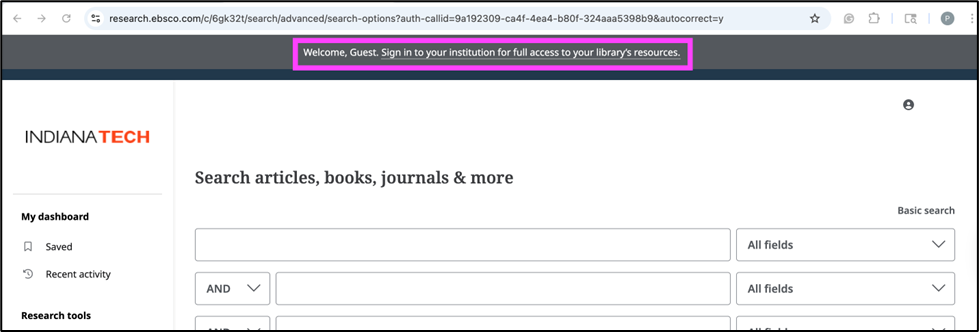
You will be directed to the Indiana Tech LetMeIn Portal. Enter your Indiana Tech credentials.

You will then be routed back to the search page on the library’s website.
Logging into a Database from a Google Search
If you’ve started your research through a Google search, you may get free access through Indiana Tech. Once you’re in the database, look for a login button that looks similar to the image below and select access through your institution.

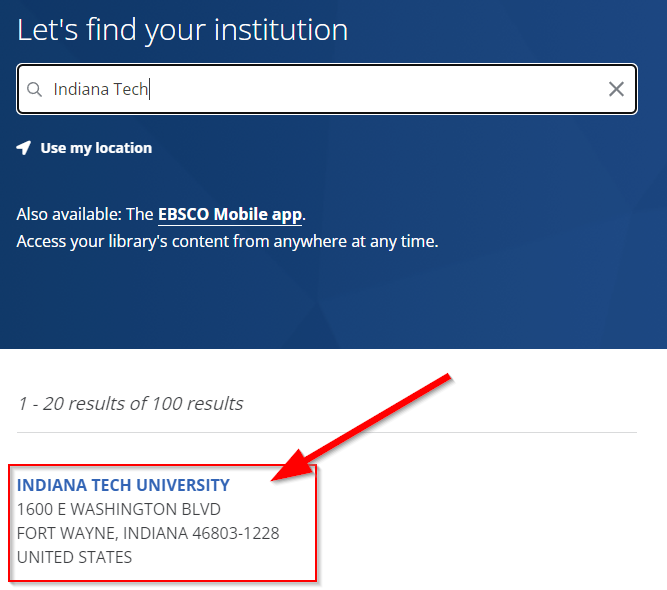
Typically, you will be prompted to find your institution, similar to the image below. Other times, you may be automatically logged in if you are already signed in to the library page through LetMeIn.
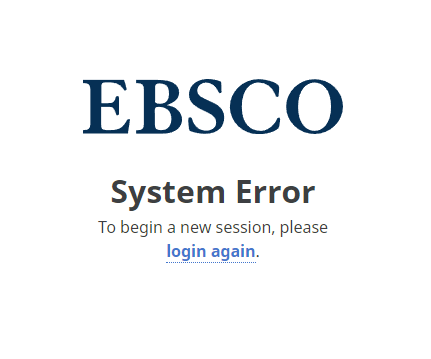
Finally, if you encounter the following error message, please clear your browser’s cache and cookies and try again:
Clearing cache and cookies
Clearing the cache and cookies from a web browser is an important first step in troubleshooting for internet browsing. The ‘cache’ is a tool used by your internet browser to speed up the page-loading process. However, sometimes it can cause a problem when websites are updated and developed as files saved in the cache may conflict with what’s coded into the website. Clearing cache and cookies is a way we can be sure that any issues you may come across are something wrong with the website, rather than inconsistencies caused by using different browsers.
IMPORTANT: Be sure to close/quit the browser and restart it after clearing the cache and cookies.